Guides, Answers and Help
Search the Knowledge Library.
Practical guides written from how the product actually works, direct answers to the questions we hear most, and the security and contact detail a procurement process asks for.
Browse the Library
Search by word, or filter by what you need. Everything below is written from how the product actually behaves.
Which product does what
Live Inbox for support, Social Studio for content, Engage & Automate for social selling.
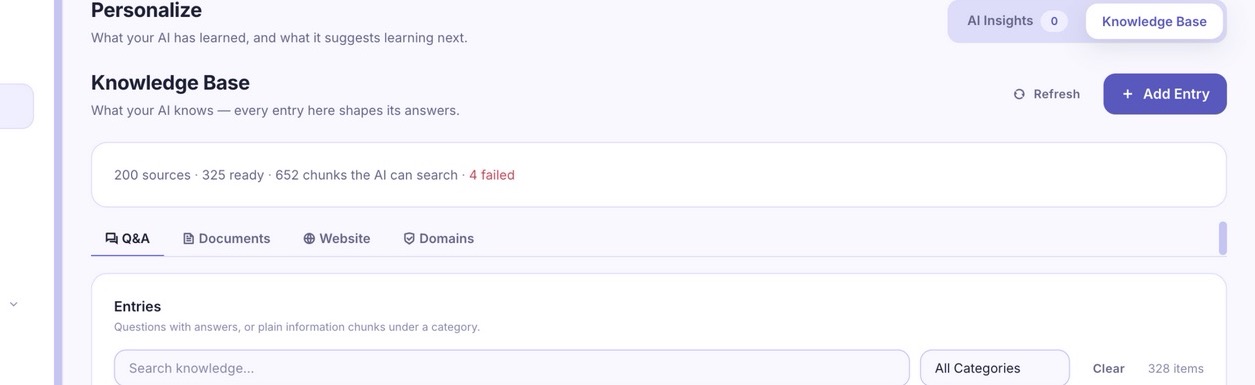
GuideTeach the AI your business
Add questions and answers, upload documents, or scan a website you own.
AnswersAnswers to common questions
Setup time, channels, pricing, data handling and self-hosting.
TrustSecurity and data handling
How accounts are protected, where data lives, and how to delete it.
GuideGetting started checklist
The short path from a free account to an AI answering real customers.
GuideBlog and walkthroughs
Longer pieces on WhatsApp, omnichannel support and self-hosting.
Browse by Product
Live Inbox guides
Connecting channels, training the AI on your knowledge base, setting up handover rules, and reading your team's response-time reports.
Social Studio guides
Building a content calendar, batch-scheduling a month of posts, using AI captions, and reading engagement analytics per platform.
Engage & Automate guides
Building a comment-to-DM flow, setting keyword triggers, running a giveaway automation, and connecting automations back into Live Inbox.
Learn
Long-form guides on using AI for customer conversations and social operations, written for business owners rather than engineers. New posts are published regularly on the blog.
AI WhatsApp Bot for Small Business
The complete guide: what a WhatsApp AI bot does, what it costs, and how a small business sets one up without an engineer.
What Is a Self-Hosted AI Helpdesk?
Why running the stack on your own VPS changes the economics, and what you own when you do.
What Is an AI Agent?
Definitions, examples, and how an agent differs from the chatbots that answer a different question with a cheerful non-answer.
Turning WhatsApp Into a Sales Channel
Practical patterns for using Live Inbox and Engage & Automate together to convert conversations into revenue.
Answers
Frequently asked questions
Channels, how the AI answers, handover behaviour, billing and data, answered directly. The fastest way to evaluate the product without a call.
Pricing detail
Every plan, every limit, and how billing works, on one page with the full feature comparison across Live Inbox, Social Studio and Engage & Automate.
Trust
Security
How customer conversations are protected: session handling, tenant isolation, webhook authentication, upload screening, and how to report a vulnerability.
Privacy policy
What data is collected, where it goes, and the rights you have under NDPR, GDPR and CCPA.
Cookie policy
The cookies this site sets, named individually, and how to refuse the ones that are not essential.
Data deletion
How to disconnect channels and erase your data, including the separate steps Meta, TikTok and Google each require.
Getting Started Checklist
1. Connect a channel
Link WhatsApp or Instagram in Live Inbox first, since it's the fastest way to see real conversations flowing in.
2. Add ten Q&As
Write ten of your most common customer questions into the knowledge base before your first test conversation.
3. Set your handover rule
Decide what triggers a human takeover, a keyword like "agent," or any message the AI can't answer confidently.
4. Turn on one automation
Start with a single Engage & Automate keyword flow, like replying "PRICE" comments with your catalog link.
Talk to a Person
Sales and general questions go to [email protected], existing accounts to [email protected], and security reports to [email protected]. The contact page routes each case to the right place and lists what you can do self-serve without waiting for a reply.
Prefer to Just Try It?
The free plan needs no card and covers 10 conversations a month. Most questions answer themselves once you see it reply to a real customer.