What Is Inside TelyChat AI?
Three Integrated Engines.
An AI agent that answers only from your knowledge base, one inbox for WhatsApp, Instagram, TikTok, Messenger, Telegram, email and web chat, lead capture, and human handover that pauses the AI when your team speaks.
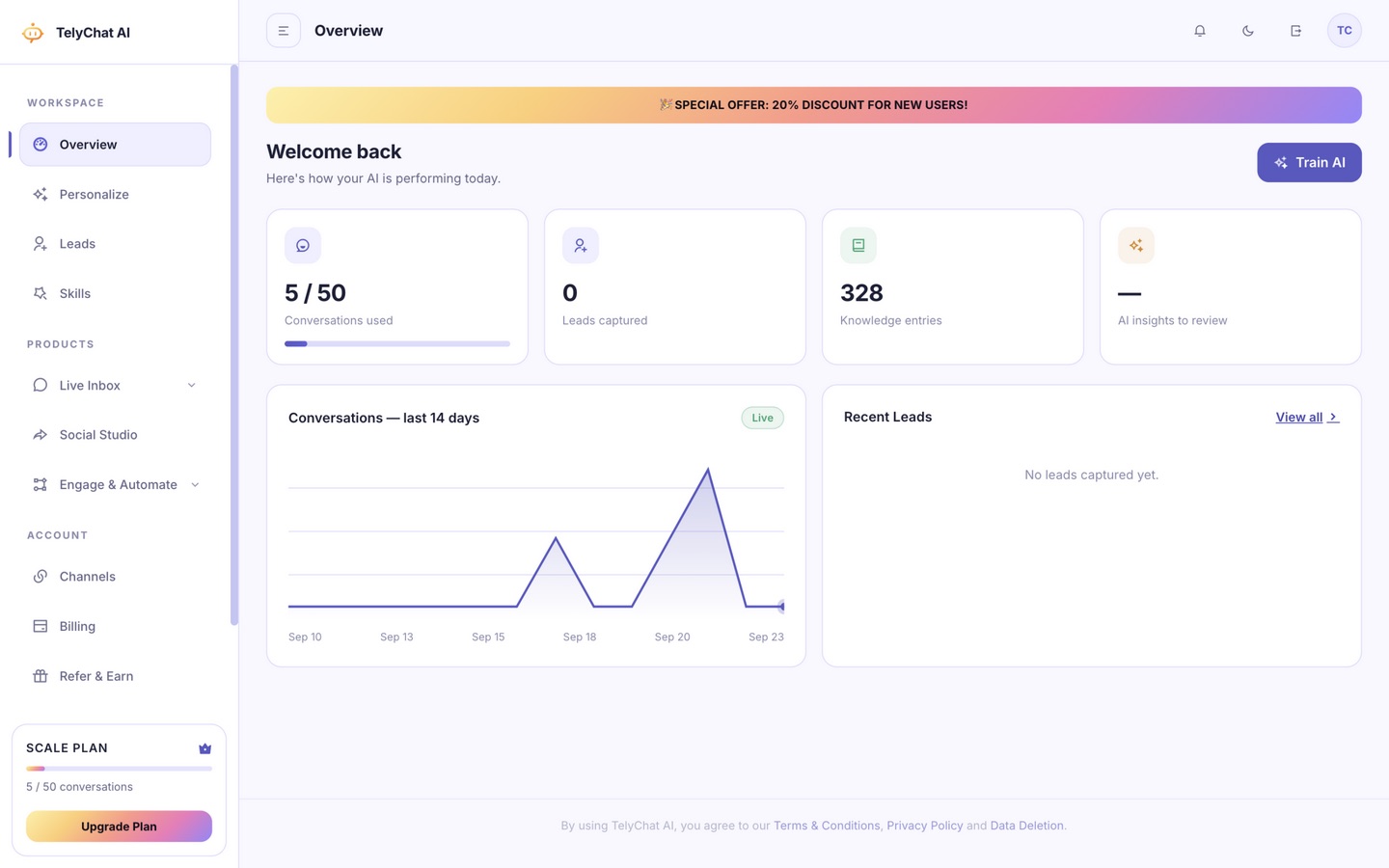
Three Products, One Connected System
Support, content and social selling share one customer record and one AI brain, so nothing is answered twice or lost between tools.
Live Inbox
WhatsApp, Instagram, TikTok, Messenger, Telegram, email and web chat, all in one screen. The AI answers first from your knowledge base, and the moment a human types, it steps aside, automatically.
- True omnichannel merge
- AI-first, human-ready
- Full contact history
- Team assignment & notes
Social Studio
Plan, schedule and publish content across Instagram, TikTok, Facebook, LinkedIn and X from one calendar. AI helps write the caption, pick the hashtags, and tell you the best time to post.
- Visual content calendar
- Multi-platform publishing
- AI captions & hashtags
- Team approval workflow
Engage & Automate
Turn comments, DMs and story mentions into automated, on-brand sales conversations. Capture leads, qualify them, and hand them to sales or close them outright, all without you touching your phone.
- Comment & DM automation
- Keyword-triggered replies
- Lead capture & routing
- Story mention handling
The AI Agent That Answers Only From Your Knowledge
The agent retrieves from a knowledge base you control and answers from what it finds. When nothing relevant is there, it says it will confirm with the team rather than guess, because a confident wrong price costs you the customer. When retrieval fails entirely, it still replies instead of leaving your customer in silence.
It routes each message to a specialist
A greeting goes to a reception behaviour, a price question to sales, a complaint to support, a request for a person straight to handover. Routing is instant and rule-based, so a complaint never receives a sales pitch.
It replies in your customer's language
The agent mirrors the language the customer wrote in, including Nigerian Pidgin, rather than forcing a translated-feeling English reply.
It remembers the customer
Long-term memory per customer means context from an earlier conversation, or from a different channel, is still available when they return.
It behaves predictably under pressure
Three questions typed in eight seconds get one coherent reply. A bare "ok" gets none. A complaint never gets an upsell. These are product rules, not suggestions.
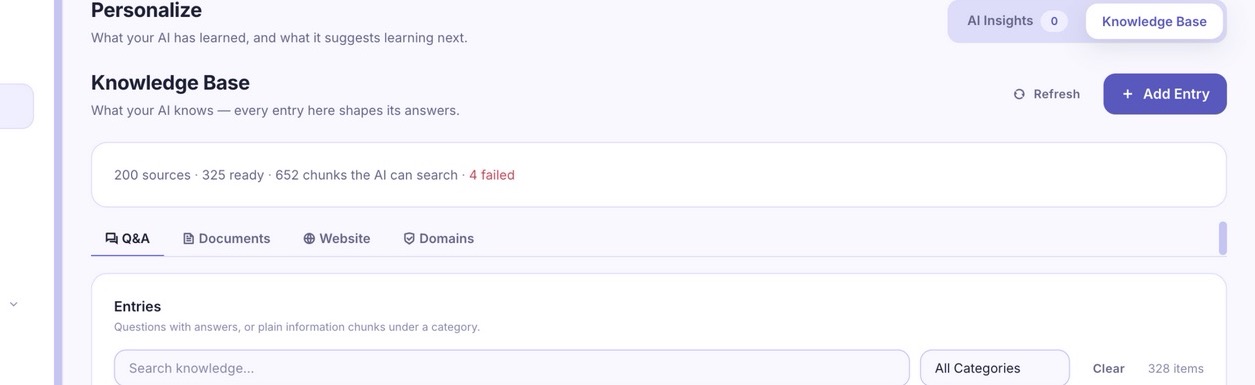
Train the AI from your own material: Q&A entries, uploaded documents and scanned pages, all searchable.
Teach It Once, in Four Ways
Everything the AI knows comes from one knowledge base, which you fill four ways: write Q&A pairs directly, upload documents (PDF, DOCX, TXT, CSV), scan your existing website, or schedule a recurring crawl. You can see, per reply, which knowledge was used.
One Inbox for Every Channel
WhatsApp, Instagram, TikTok, Messenger, Telegram, email and your website widget all arrive in one place, built on Chatwoot. Connect channels once from the dashboard, subject to your plan's inbox allowance, and answer from a single screen with your team.
When a human replies, the AI pauses for that conversation and resumes on its own afterwards, so your agents are never talking over a bot. If a customer asks for a person, the conversation is assigned to an agent with the full history, and they are never asked to re-explain themselves.
The Workspace Around It
Lead capture
The AI gathers contact details at the right moment, after a customer confirms payment, never mid-complaint or on a price enquiry. Captured leads appear in your dashboard.
Overview and insights
Usage against your plan, conversation activity, and AI suggestions for knowledge base improvements you can approve or dismiss.
Skills
Define behaviours in plain words, triggered by keywords, that shape how the AI handles a process. Skills change behaviour, never facts.
Social Studio and Engage
Publishing and comment automation for your social channels, included on paid plans, alongside the AI inbox rather than inside it.
From Signup to a Real Answer
Four steps, and the first three need no card and no technical setup.
-
Create a free account
The free plan includes 10 conversations a month, one inbox and two agents, with the AI chatbot, WhatsApp, the knowledge base and lead capture included.
-
Connect one channel
Start with the channel your customers already use. WhatsApp is the most common first step; Instagram, TikTok, Messenger, Telegram, email and a website widget are all available.
-
Teach the AI your business
Add questions and answers, upload documents, or scan a website you own. The AI answers from that material only, and says so when it cannot find an answer instead of guessing.
-
Watch it answer, then take over when needed
Read the first real conversations, correct anything that is off, and step in yourself at any point. The AI pauses while a human has the thread and returns when they are done.
Own the Whole Stack If You Want To
TelyChat AI is built on Chatwoot, n8n and Supabase, all of which run on your own server or VPS. Self-hosting means the conversation data, the database and the AI layer are yours, and you pay infrastructure costs instead of per-seat pricing. Embeddings are produced locally on the tenant's infrastructure either way, so your knowledge base does not leave; reply generation passes through an LLM gateway, which we disclose plainly.
See It on Your Own Conversations
The free plan covers 10 conversations a month and needs no card. Connect WhatsApp, add a few Q&As, and watch the answers.